 f21d3ce132
## Summary

Re-lands the completed Fusion board task FX-005 on current upstream
`main`, stacked on #2374 (FX-004).

- adds a narrowly authorized additive publication path for archived task
documents
- preserves archived task and mission state and keeps ordinary
replacement/deletion writes rejected
- exposes retained archived current/revision reads
- requires project-scoped revision/hash CAS for publication
- maps malformed, unauthorized, missing, inconsistent, and stale states
safely
- rebases preserved dashboard drafts explicitly after CAS conflicts

## Why

Operators need to append a correction or evidence revision to an
archived task without unarchiving it or weakening ordinary archived-task
immutability.

## Dependency

This branch contains #2374 plus the eight FX-005 commits because
cross-fork PRs cannot target a fork-only base branch. After #2374 lands,
this PR should be rebased or refreshed so its diff collapses to FX-005
only.

## Validation

- PostgreSQL task-store and archived-default suites: 33/33
- dashboard route and editor suites: 321/321
- agent document tools: 22/22
- core, dashboard, and engine typechecks pass

<!-- This is an auto-generated comment: release notes by coderabbit.ai
-->

## Summary by CodeRabbit

* **New Features**
* Added optimistic concurrency controls for task document creation and
editing using revisions and content hashes.
* Added safe, authenticated append-only corrections for documents
retained on archived tasks.
* Archived documents and revision history remain available for direct
reading.
* Agent and dashboard tools now report conflicts clearly and support
explicit draft rebasing.
* **Bug Fixes**
  * Prevented stale updates from overwriting newer document content.
* Preserved archived-task immutability while allowing controlled
corrections.
* **Documentation**
* Updated CLI, dashboard, storage, task-management, and agent guidance
for these workflows.

<!-- end of auto-generated comment: release notes by coderabbit.ai -->

---------

Co-authored-by: fusion-merge-train <merge-train@topkoli.local>
Co-authored-by: Fusion <noreply@runfusion.ai>
Co-authored-by: v <v@v.speedport.ip>
Co-authored-by: Claude Opus 4.8 <noreply@anthropic.com>

@runfusion/fusion
From rough idea to production code — automatically.
Multi-node agent orchestrator — tasks, agents, missions, git, files, and worktrees, with any model, local or cloud.
runfusion.ai → · GitHub · Docs

Install
Zero install, straight from npm:
npx runfusion.ai
Boots the dashboard. Subcommands forward through (npx runfusion.ai task list, etc). Long form: npx @runfusion/fusion dashboard.
One-line installer (macOS & Linux — auto-picks Homebrew, falls back to npm):
curl -fsSL https://runfusion.ai/install.sh | sh
Homebrew (macOS & Linux):
brew install runfusion/fusion/fusion
Fully-qualified install auto-taps and, on Homebrew 6.0+, trusts only this formula. If short-name install fails with “untrusted tap”, run brew trust --formula runfusion/fusion/fusion then brew install fusion.
npm global:
npm install -g @runfusion/fusion
fn dashboard              # or: fusion dashboard
Launch the dashboard
From a shell:
fn dashboard                 # or: fusion dashboard / npx @runfusion/fusion dashboard
fn dashboard --paused        # start with automation paused
fn dashboard --dev           # development-mode dashboard + AI engine
fn dashboard --no-engine     # web UI only, no AI engine
The dashboard gives you:
- A live kanban board — tasks move through columns automatically as AI works on them
- Task detail view — generated spec, step-by-step progress, reviewer verdicts, full execution log
- Dependency-aware scheduling — declare task dependencies or let the engine infer them
- Auto-merge — on by default; reviewed work squash-merges without you lifting a finger
- Parallel execution — independent tasks run simultaneously in isolated git worktrees
- Self-sustaining board — agents may spawn follow-up tasks; the board feeds itself
Your entire dev environment. On a single pane of glass.
Describe a task in plain language. A triage agent reads your project, understands context, and writes a full PROMPT.md spec — steps, file scope, acceptance criteria. Then Fusion plans, reviews, executes, and reviews again, in an isolated git worktree, with a human approval gate wherever you want one.
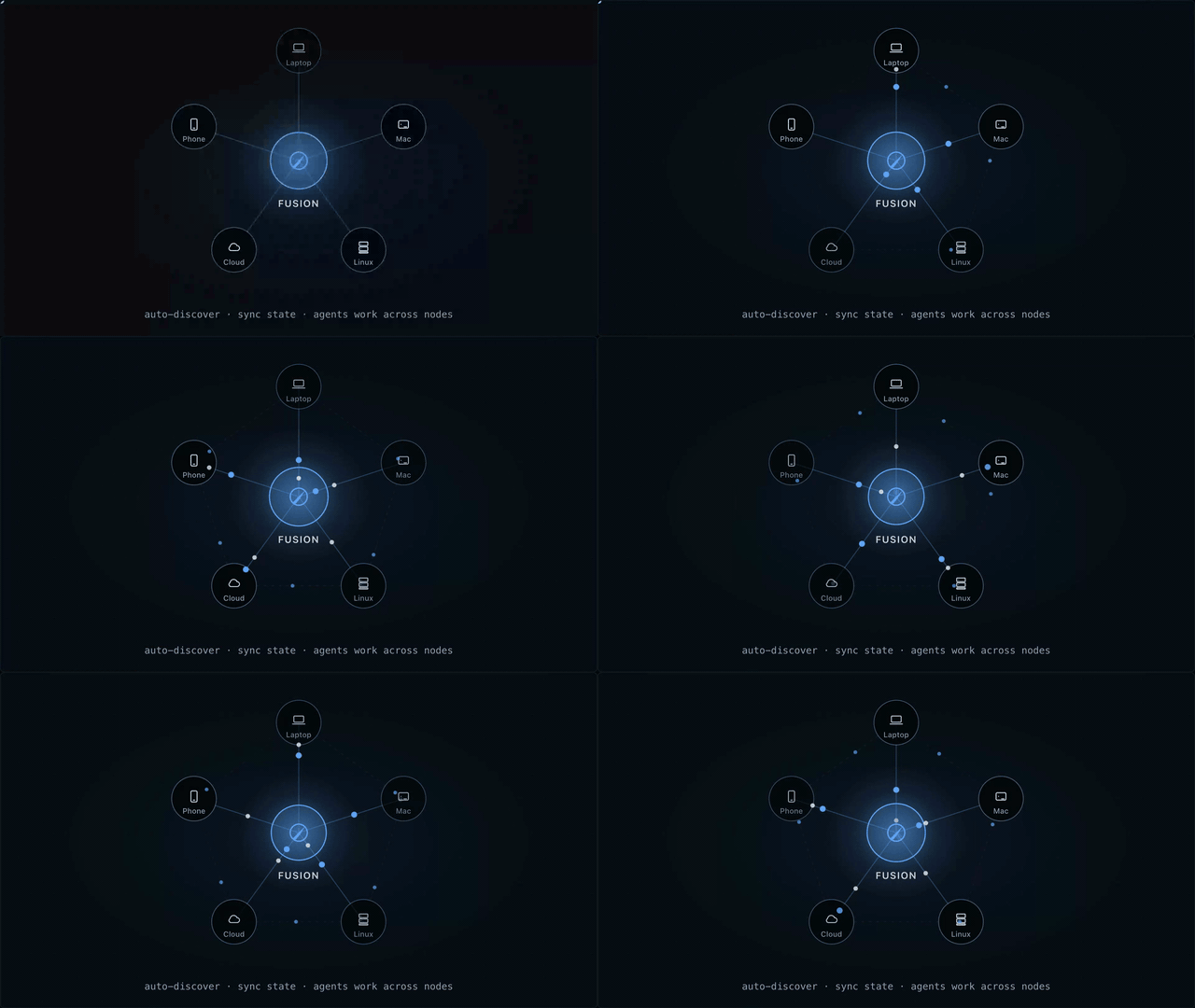
One board. Controlled from anywhere. Laptop, Mac mini, Linux server, cloud VM, phone — all connected.
Run an agent company
Import a team. Run it autonomously for weeks. 440+ agents across 16 companies, wired for missions, mailboxes, and inter-agent delegation.
npx companies.sh add paperclipai/companies/gstack

How it works
You create a task with a rough description. A pipeline of specialized agents takes over.
Specification. A triage agent reads your codebase — file structure, existing patterns, related code — and turns your rough idea into a detailed spec. It breaks the work into discrete steps, identifies which files are in scope, writes acceptance criteria, and assigns a complexity rating that determines how aggressively the work gets reviewed.
Scheduling. Tasks declare dependencies on each other. The scheduler builds a dependency graph and starts work only when upstream tasks are done. Independent tasks run in parallel — each in its own isolated git worktree, so there are no conflicts during execution.
Execution & review. An executor agent works through the spec step by step in the worktree. At each step boundary, a separate reviewer agent, with read-only access, independently evaluates the work. The reviewer can approve (continue), request revisions (fix specific issues), or force a rethink (change the approach entirely). Review depth scales with the task's complexity rating: trivial tasks get light checks, complex tasks get thorough multi-pass review.
Merge. When execution finishes and the reviewer signs off, the task moves to In Review:
- Direct merge (default) — automatically squash-merges the completed task branch into your current branch with a clean commit.
- Pull request — automatically creates or links a GitHub PR, waits for reviews/checks, then merges once policy conditions are satisfied.
autoMerge controls whether Fusion performs completion automatically. If disabled, tasks stay in In Review until you finish the merge yourself. For PR-first mode, authenticate GitHub with gh auth login.
Tasks flow through: Triage → Todo → In Progress → In Review → Done.
This execution model is heavily based on Taskplane.
What makes it different
| 🧠 AI specification | Rough idea in, detailed PROMPT.md out — steps, file scope, acceptance criteria. |
| 🔁 Workflow gates | Plan → Review → Execute → Review on every step. Block or pass automatically. |
| 🌳 Worktree isolation | Each task runs in its own branch and worktree. Parallel tasks. Zero conflicts. |
| ⚡ Smart merge | Passing every gate? Fusion squash-merges and moves on. |
| 🛰️ Multi-node mesh | Laptop, server, cloud, phone — all synced. Desktop, mobile, web. |
| 🧩 Any model | Anthropic, OpenAI, Ollama, and more. |
| 🏢 Agent companies | Import pre-built teams — 440+ agents across 16 companies. |
| 📬 Inter-agent messaging | Built-in mailbox between agents. Delegate, clarify, coordinate. |
| 🗺️ Missions | Hierarchical planning with autopilot and validation contracts. |
| 🔓 Open source. MIT. | No vendor lock-in. Run it on your own hardware. |
Working from chat
Manage tasks without leaving the conversation:
"Every ten minutes, analyze the server code for logic the client hasn't implemented yet and create tasks. Tasks may spawn additional tasks, so just add enough to keep the board saturated."
"Create a Fusion task to fix the login redirect bug"
"Add a task for dark mode support, it depends on FN-003"
"What's the status of FN-042"
"Attach screenshot.png to FN-007"
"Pause FN-012 — I want to add more context first"
The Fusion extension exposes tools to create tasks, check progress, attach files, and pause or resume automation.
Standalone CLI
See STANDALONE.md for additional installation and usage options.
Optional provider: Factory AI via Droid CLI
@runfusion/fusion now ships a vendored @fusion/droid-cli extension in the published CLI bundle.
To use it:
- Install the
droidbinary and ensure it is on yourPATH - Authenticate with Droid CLI (
droid auth login) - In Fusion dashboard, go to Settings → Authentication and enable Factory AI — via Droid CLI
- Restart Fusion when prompted so the extension is loaded into the runtime
Once enabled, droid-cli models appear in Fusion model selection.
Maintainer note: workspace plugins in published CLI bundles
When CLI or dashboard runtime code imports workspace plugin packages (for example @fusion-plugin-examples/roadmap), those imports must stay statically analyzable and covered by packages/cli/tsup.config.ts noExternal rules so plugin runtime code is inlined into dist/bin.js.
Do not introduce dynamic or variable module specifiers for workspace plugin runtime paths in the published execution path. If a workspace plugin is needed for bundled auto-install, stage a bundled plugin entry (dist/plugins/<id>/bundled.js) rather than copying raw TypeScript source into dist/.
Full documentation
Architecture details, development setup, and contributor info live in the project README.
License
MIT — see LICENSE.