 fd9a1b186a
- Add mergeStrategy setting (fast-forward, squash, merge-commit) to config
- Implement PR-first auto-completion flow that monitors PR merge status
- Wire PR monitoring service to detect merge completion and trigger auto-close
- Add PR status UI to dashboard with merge progress indicator
- Update settings modal with merge strategy selector
- Add changeset for PR-first merge mode feature
94 lines
4.5 KiB
Markdown
94 lines
4.5 KiB
Markdown
# @dustinbyrne/kb
|
|
|
|
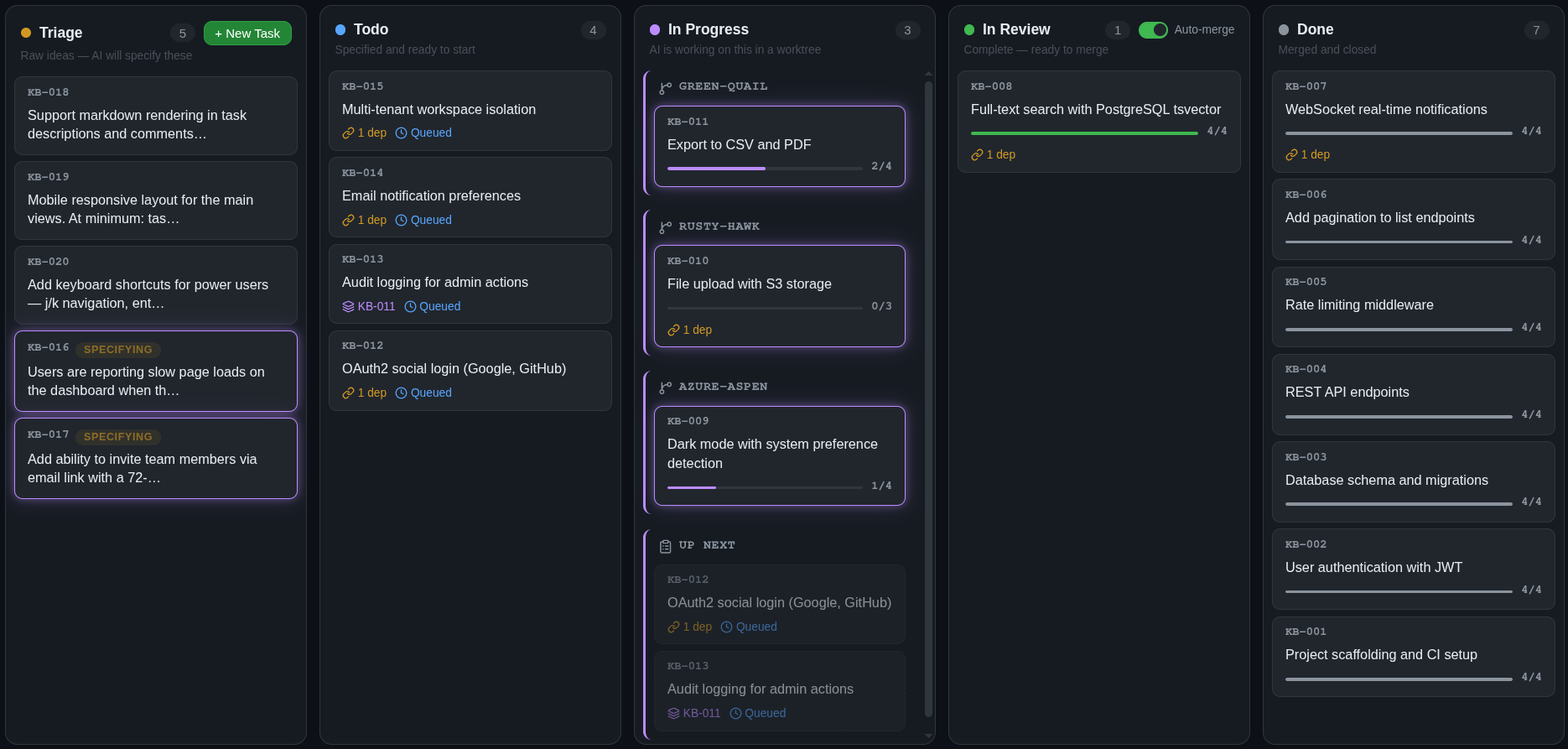
An automated Kanban board for [pi](https://github.com/badlogic/pi-mono). You (or an agent) add high level ideas to your task list, and a team of agents execute them using worktrees.
|
|
|
|
|
|
|
|
## Installation
|
|
|
|
```bash
|
|
pi install npm:@dustinbyrne/kb
|
|
```
|
|
|
|
This gives pi the ability to manage and create tasks in your kanban dashboard.
|
|
|
|
## The dashboard
|
|
|
|
Run `/kb` in pi to launch the dashboard and AI engine.
|
|
|
|
```
|
|
/kb # start on default port 4040
|
|
/kb stop # stop it
|
|
/kb 8080 # run on a custom port
|
|
```
|
|
|
|
The dashboard gives you:
|
|
|
|
- **A live kanban board** — tasks move through columns automatically as AI works on them
|
|
- **Task detail view** — see the generated spec, step-by-step progress, reviewer verdicts, and full execution log
|
|
- **Dependency-aware scheduling** — declare dependencies between tasks or let the engine infer them; work starts in the right order automatically
|
|
- **Auto-merge** — on by default; reviewed work squash-merges into your branch without you lifting a finger
|
|
- **Parallel execution** — independent tasks run simultaneously in isolated git worktrees
|
|
- **Self-sustaining board** — agents may spawn follow-up tasks as they work, which get triaged, scheduled, and executed like any other task; the board feeds itself
|
|
|
|
## How it works
|
|
|
|
You create a task with a rough description. From there, a pipeline of specialized agents takes over.
|
|
|
|
### Specification
|
|
|
|
A triage agent reads your codebase — file structure, existing patterns, related code — and turns your rough idea into a detailed specification. It breaks the work into discrete steps, identifies which files are in scope, writes acceptance criteria, and assigns a complexity rating that determines how aggressively the work gets reviewed later.
|
|
|
|
### Scheduling
|
|
|
|
Tasks declare dependencies on each other. The scheduler builds a dependency graph and starts work only when upstream tasks are done. Independent tasks run in parallel — each in its own isolated git worktree, so there are no conflicts during execution.
|
|
|
|
### Execution & review
|
|
|
|
An executor agent works through the spec step by step in the worktree. At each step boundary, a separate reviewer agent, with read-only access, independently evaluates the work. The reviewer can approve (continue), request revisions (fix specific issues), or force a rethink (change the approach entirely). Review depth scales with the task's complexity rating: trivial tasks get light checks, complex tasks get thorough multi-pass review. This execution model is heavily based on [Taskplane](https://www.npmjs.com/package/taskplane).
|
|
|
|
### Merge
|
|
|
|
When execution finishes and the reviewer signs off, the task moves to "in review." kb supports two completion modes:
|
|
|
|
- **Direct merge** *(default)* — automatically squash-merges the completed task branch into your current branch with a clean commit.
|
|
- **Pull request** — automatically creates or links a GitHub PR for the task branch, waits for GitHub reviews/checks, then merges the PR once policy conditions are satisfied.
|
|
|
|
`autoMerge` still controls whether kb performs completion automatically at all. If `autoMerge` is disabled, tasks stay in **In Review** until you finish the merge yourself.
|
|
|
|
For PR-first mode, authenticate GitHub with `gh auth login` or `GITHUB_TOKEN`, and make sure the task branch already exists on GitHub as `kb/<task-id-lower>`. kb does **not** push branches for you before PR creation.
|
|
|
|
Worktrees can be cleaned up after merge or reused by the next task to keep build caches warm.
|
|
|
|
Tasks flow through: **Triage → Todo → In Progress → In Review → Done**.
|
|
|
|
## Working from chat
|
|
|
|
You can manage tasks without leaving the conversation:
|
|
|
|
> "Every ten minutes, analyze the server code for logic the client hasn't implemented yet and create tasks. Tasks may spawn additional tasks, so just add enough to keep the board saturated."
|
|
|
|
> "Create a kb task to fix the login redirect bug"
|
|
|
|
> "Add a task for dark mode support, it depends on KB-003"
|
|
|
|
> "What's the status of KB-042"
|
|
|
|
> "Attach screenshot.png to KB-007"
|
|
|
|
> "Pause KB-012 — I want to add more context first"
|
|
|
|
The extension gives pi tools to create tasks, check progress, attach files, and pause or resume automation.
|
|
|
|
## Standalone CLI
|
|
|
|
kb also works as a standalone CLI outside of pi. See [STANDALONE.md](./STANDALONE.md) for installation and usage without the pi extension.
|
|
|
|
## Full documentation
|
|
|
|
For architecture details, development setup, and contributor info, see the [project README](https://github.com/dustinbyrne/kb#readme).
|
|
|
|
## License
|
|
|
|
ISC
|