 3badc244a7
## U12 part 2 — the three U5 reconciliation guards now actually fire

USER-VISIBLE. Taken on standing authority; here is exactly what changed
for operators.

All three read the RAW `experimentalFeatures.workflowColumns` key via
`store.workflowColumnsFlagOn()`. Nothing in production writes it, so all
three have been inert since the workflow-columns cutover.

| Guard | Before (every real project) | After |
|---|---|---|
| Workflow edit removing an **occupied** column | Save succeeded; cards
left in a column the workflow no longer declares | Save fails with
`OccupiedColumnsError` unless `rehomeTo` is supplied |
| Workflow **delete** | Occupant capture returned `[]`; cards sat in the
deleted workflow's columns until the next engine start | Cards move to
the default workflow's entry column as part of the delete |
| Workflow **switch** | Never reconciled; the `reconciliation` field in
the declared return type was never populated | Card in an undeclared
column moves to the resolved target; a declared column is preserved |

Both consumers already handle the new outcomes and needed no change:
`register-workflow-routes.ts` maps `OccupiedColumnsError` to a
structured 409 carrying per-column occupant counts, and
`fn_workflow_update` returns a retryable structured result. The
dashboard editor's `rehomeTo` retry flow becomes reachable for the first
time. I only updated two stale "flag-ON" comments there — that code was
correct all along and simply never fired.

### What an operator actually sees (USER-VISIBLE — read this bit)

Four changes to what the board and the API do. Nothing here is silent.

1. **Editing a workflow to remove a column that has cards in it now
FAILS.** Previously the save succeeded and the cards were left in a
column their workflow no longer declared. The dashboard shows the
existing 409 with per-column occupant counts and prompts for a re-home
target; retrying with `rehomeTo` moves the cards and saves. Removing an
EMPTY column is unaffected.
2. **Deleting a workflow moves its cards immediately** to the default
workflow's entry column, instead of leaving them until the next engine
start.
3. **Switching a task's workflow moves the card** when the new workflow
does not declare its current column. A card whose column IS declared
stays exactly where it is. The API response now carries the
`reconciliation` summary it always promised.
4. **A switch whose re-home would be REJECTED is now refused before
anything is written.** If the destination column is at its WIP limit,
the switch fails with a structured 409 (`workflow-switch-rehome-failed`)
naming the task, both columns and the reason — and **nothing changes**:
the task keeps its current workflow AND its current column. Retry after
making room. Previously this combination committed the selection and
then silently reported a move that never happened, leaving selection and
column disagreeing.

**Can a torn card still happen? Yes, in one narrow case, and here is how
you recover.** If the destination fills in the window between the
pre-flight and the move, the selection is already committed and the card
ends up in a column its new workflow does not declare. That case is not
silent: it writes a `task:workflow-switch-torn` run-audit row, and the
error carries `selectionCommitted: true` with both columns. Recovery:
make room in the destination and move the card there, or switch the task
back — and if neither happens, the R7 startup sweep
`reconcileUndeclaredTaskColumns` re-homes it on the next engine start.
The card is never lost; it is visible in a lane the board may not draw
until one of those runs.

The one thing to watch after merge: (1) converts a previously-silent
success into a visible failure, so an operator mid-edit on a busy
workflow will start seeing a 409 they never saw before. That is the
point — the alternative was stranding their cards — but it is the change
most likely to generate a "this used to work" report.

### The thing that made this more than a gate removal

Un-gating the switch guard surfaced that
`selectTaskWorkflowAndReconcileImpl` read the task through
`store.readTaskFromDb` — the **synchronous SQLite** reader, which throws
under PostgreSQL:

```
TaskStore.db: SQLite Database is not available in backend mode
```

The flag returned before that line, so the gate was hiding a path that
**could not execute at all in the production backend**, not merely a
disabled feature. Ported to the async `readTaskRow`. Found by the new
tests, not by reading the code.

### Review round 2 (both findings real, both fixed)

**Torn write with no alarm — fixed by ORDERING, not by a louder
message.** My first attempt only made the error loud, which left the
torn state intact. The real fix is that the deterministic rejection
cause (destination at its WIP limit) is now checked BEFORE
`selectTaskWorkflow` commits, by resolving the target IR straight from
`workflowId` instead of through the task's selection. Nothing commits on
that path.

For the residual race the failure is loud AND recorded: `rehomeOccupant`
now returns `{ moved, error? }` (additive; sweep callers ignore it), the
switch writes a `task:workflow-switch-torn` run-audit row, and throws
`WorkflowSwitchRehomeFailedError` with `committed: true`. Consumers
translate it: the dashboard route returns a structured 409 with
`selectionCommitted`, and `fn_task_set_workflow` returns the same fields
— no more generic "something went wrong".

**Fabricated column for a deleted task.** My first fix fell back to
`fromColumn` when the final read found no row, so a task soft-deleted
mid-switch was reported as having its old column *preserved*. Absent now
reads as absent (the optional `reconciliation` is omitted). Extracted as
the pure `buildSwitchReconciliation` seam because the window is not
reachable through the public call — `selectTaskWorkflow` rejects an
already-deleted task up front — so it is a genuine race, and I test the
decision directly rather than asserting it from reading the code.

### Revert-proof, measured

New `workflow-reconciliation-production-shape.pg.test.ts` — 6 cases,
with the flag **never written**, which is the configuration every real
project has. Each flip reverted individually:

- re-gate the edit guard → **2 failures** (OccupiedColumnsError case;
rehomeTo re-home case)
- re-gate the delete capture → **1 failure** (card stays in
`custom-hold`)
- restore the switch early return → **2 failures** (`reconciliation`
undefined; card does not move)
- all three in place → **6/6 green**

Round-2 fixes, also measured:
- restore the `fromColumn` fallback → the "row is gone" case fails
(reports `preserved: true` for a deleted task)
- drop the `!outcome.moved` throw → the capacity-blocked case fails
(resolves instead of raising)
- **move the capacity pre-flight back AFTER the commit → the case fails
on the SELECTION assertion** (expected `WF-002`, received `WF-001`),
i.e. it proves the ordering, not the wording

The pre-existing coverage in `workflow-authoritative-reads.pg.test.ts`
reached the occupied-column guard by **writing the flag ON itself** —
same pattern as the ListView/Board suites in part 1. Its flag write is
removed; it now runs in the production shape.

### Where I nearly got this wrong

My first revert harness was buggy and I briefly concluded the delete
re-home was **redundant** — I had probed the stored column and seen
`triage` with what I thought was the flip reverted. It wasn't.
`workflow-ops.ts` contains two identical `const occupantTaskIds = await
store.listWorkflowOccupantTaskIds(id, false)` lines (field-reconcile
block, delete path), so my first-match edit reverted the wrong one.
Re-run anchored on surrounding context, the delete case fails as
predicted. Recorded in the test header as a caution. I also chased and
**refuted** a scarier hypothesis along the way — that an unrelated
`updateTask` coerces a custom column back to `triage`. It does not; the
column survives.

### Deliberately NOT in this PR

The v1-IR rollback-compat persistence (`downgradeIrToV1IfPure`) on the
workflow UPDATE path. It shared the same `flagOn` variable, which is how
it surfaced: **one flag read was feeding two unrelated decisions, so the
flag has more decision sites than call sites** — my earlier 9-site
inventory undercounted. It chooses the stored *shape* of the graph
rather than gating a guard, so it is a persistence-format change with a
different blast radius. It now reads the flag explicitly, behaviour
unchanged, for a follow-up.

The `moves.ts` group remains U2b's.

### Verification

`pnpm test:gate` (307 + 10 + 71), `pnpm lint`, `pnpm verify:fast` (17
steps), both typechecks green. Full `packages/core` PostgreSQL suite:
**1042 passed, 3 failed** — `central-archive-secrets.test.ts`
(log-prefix assertion) and
`workflow-settings-project-identity.pg.test.ts` (×2, project-id
resolution). I confirmed the identical 3 failures on a stashed clean
tree: pre-existing, unrelated. No Fusion instance booted.


<!-- This is an auto-generated comment: release notes by coderabbit.ai
-->

## Summary by CodeRabbit

* **Bug Fixes**
* Workflow edits now prevent removal of occupied columns unless cards
are moved to a specified destination.
* Cards are automatically re-homed when workflows are deleted or
switched.
* Workflow switches now check destination capacity before committing and
provide clear conflict details when re-homing fails.
* Reconciliation results now indicate whether cards were moved or
preserved.


<!-- end of auto-generated comment: release notes by coderabbit.ai -->

---------

Co-authored-by: Claude Opus 5 (1M context) <noreply@anthropic.com>
 Fusion

From rough idea to production code — automatically.
🏭 A software factory, run by a multi-agent orchestrator.
Describe what you want — a team of AI agents plans, builds, reviews, and ships it for you. Fusion is your software factory: an assembly line for code that runs across tasks, agents, missions, git, files, and worktrees, with any model, local or cloud.
runfusion.ai → · Docs · GitHub · npm · Discord
English · 简体中文 · 繁體中文 · Français · Español · 한국어





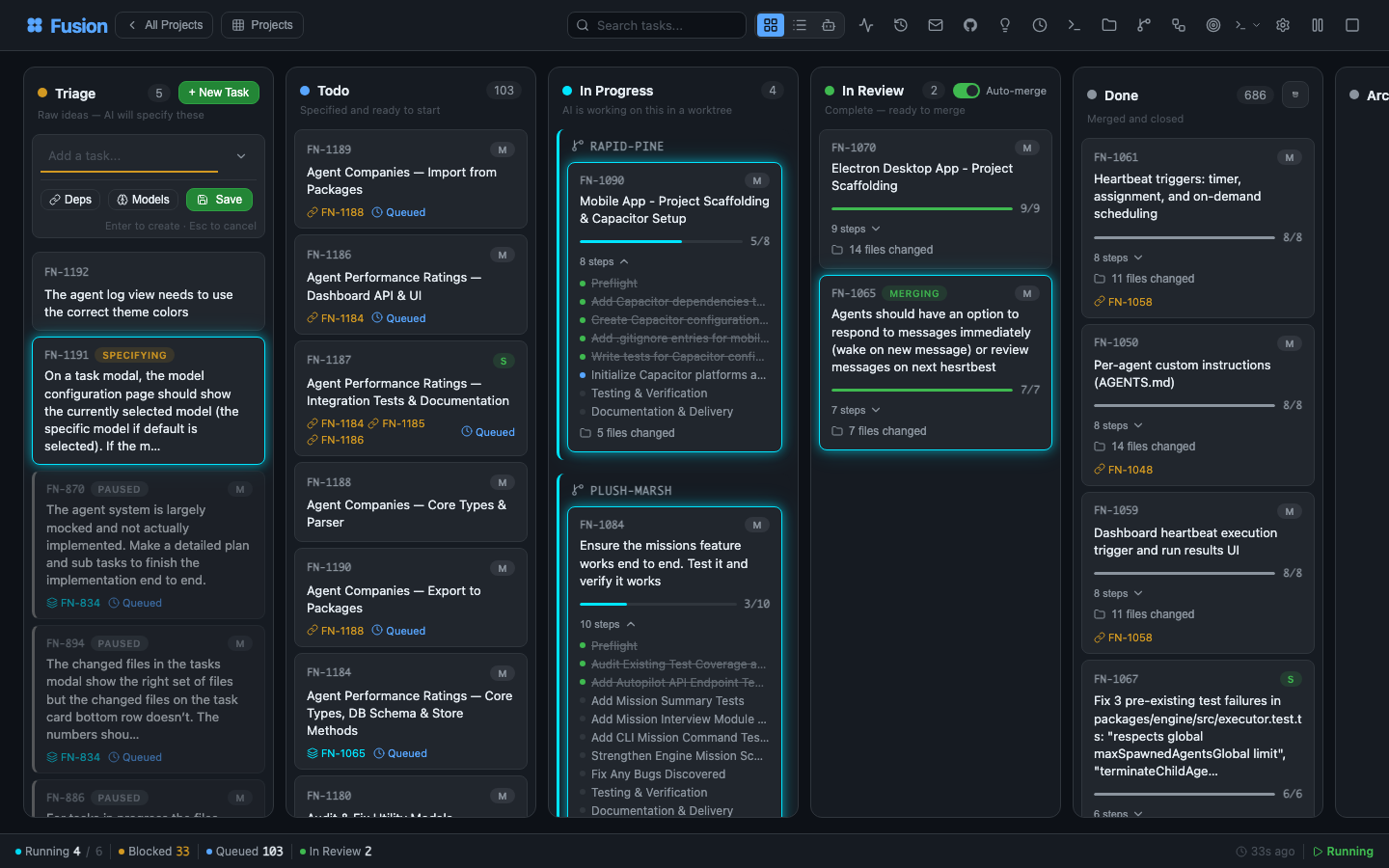
Your entire dev environment. On a single pane of glass.
Describe a task in plain language. A planning agent reads your project, understands context, and writes a full PROMPT.md plan — steps, file scope, acceptance criteria. Then Fusion plans, reviews, executes, and reviews again, in an isolated git worktree, with a human approval gate wherever you want one.
One board. Controlled from anywhere. Laptop, Mac mini, Linux server, cloud VM, phone — all connected.
Like Trello, but your tasks get specified, executed, and delivered by AI. Built on the great work of dustinbyrne/kb.
Quick start
Zero install, straight from npm:
npx runfusion.ai
That launches the dashboard. Subcommands forward through: npx runfusion.ai task create "fix X", npx runfusion.ai --help, etc. (Or verbosely: npx @runfusion/fusion dashboard.)
One-line installer (macOS & Linux — auto-picks Homebrew, falls back to npm):
curl -fsSL https://runfusion.ai/install.sh | sh
fusion dashboard
Homebrew (macOS & Linux):
brew install runfusion/fusion/fusion
fusion dashboard            # or: fn dashboard
Fully-qualified install auto-taps and, on Homebrew 6.0+, trusts only the Fusion formula. If you already ran brew tap runfusion/fusion and short-name install fails with “untrusted tap”, run brew trust --formula runfusion/fusion/fusion then brew install fusion.
npm global:
npm install -g @runfusion/fusion
fn dashboard                # or: fusion dashboard
From a clone (for development):
pnpm dev dashboard
Then click the Open: URL printed in the terminal. It embeds a bearer token
(http://localhost:4040/?token=fn_...) that the browser captures to
localStorage on first visit and reuses automatically thereafter. On the
server side, Fusion now persists the dashboard/daemon token in
~/.fusion/settings.json on first authenticated run and reuses it on later
starts unless you override it (--token, FUSION_DASHBOARD_TOKEN,
FUSION_DAEMON_TOKEN) or disable auth with --no-auth. See
CLI reference → fn dashboard → Authentication
for full precedence and reset/revocation options.
First-run setup
On first launch, Fusion opens the onboarding wizard with three guided steps:
- AI Setup — Use a simplified quick-start provider list (recommended providers plus any already-connected providers), then expand Advanced provider settings only if you need additional providers or setup details. You only need one provider to get started. Deprecated Google Gemini CLI / Antigravity provider entries are intentionally hidden; Google/Gemini API key, Google Generative AI, Vertex, and Cloud Code paths remain supported.
- GitHub (Optional) — Connect GitHub for issue import and PR management
- First Task — Create your first task or import from GitHub (if no project is active, onboarding first prompts you to register/select a project directory)
The wizard is dismissible and non-blocking — click Skip for now to use the dashboard immediately. Re-trigger it later from Settings → Authentication → Reopen onboarding guide.
Mobile
For Capacitor + PWA workflow, see MOBILE.md.
The flow
  ①  Describe          ②  Planning             ③  The board           ④  Isolated worktree
  ─────────────        ─────────────         ─────────────          ─────────────────────
  "Add dark mode   →   Agent writes    →   Plan → Review →    →   fusion/FN-123 branch
   toggle to           PROMPT.md           Execute → Review        concurrent, zero
   settings panel"     (steps, scope,      (per step, until        file conflicts
                       acceptance)         done)
See every step, before the merge
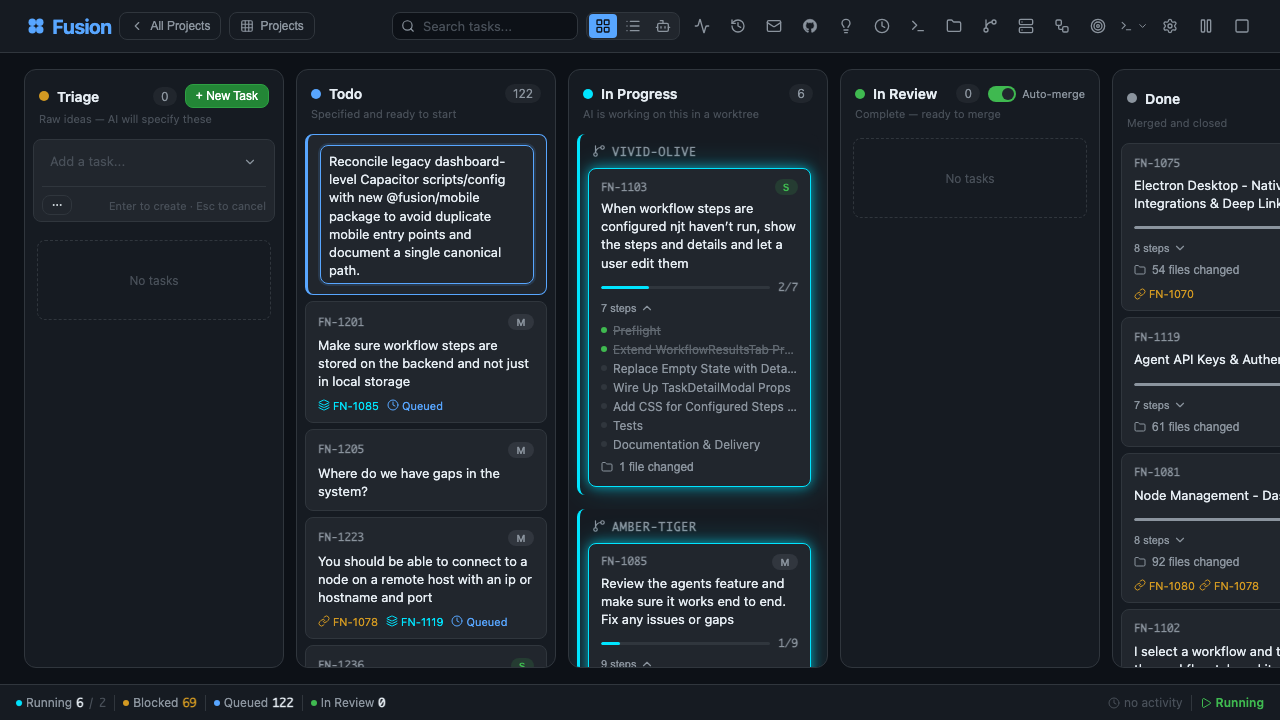
Every task shows its plan, its reviews, its diffs, and its file changes in real time. Jump into an active task and nudge direction, tighten constraints, pause, or re-prompt.
What makes it different
| 🧠 AI planning | Describe a task in plain language. Planning agents turn it into a PROMPT.md plan with steps, file scope, and acceptance criteria. |
| 🔁 Selectable workflows | Built-ins cover coding, quick fixes, review-heavy work, stepwise execution, plugin-gated Compound Engineering, and PR lifecycle fragments. Pick a workflow per task or author custom ones in the Workflow Editor. |
| 🛡️ Planner oversight | Per-task or per-workflow oversight level (off / observe / steer / autonomous) governs how closely a planner overseer watches and intervenes — merge/PR and destructive actions always require explicit human confirmation. See Settings Reference and Dashboard Guide. |
| 🌳 Worktree isolation | Each task runs in its own branch and worktree (fusion/{task-id}). Parallel tasks. Zero conflicts. Optional worktrunk delegation via worktrunk.enabled (see WorktreeBackend abstraction). |
| 🗄️ PostgreSQL by default | Fusion uses zero-config embedded PostgreSQL for local runtime metadata. Legacy SQLite files are one-time migration inputs only; use a shared external database for multi-project and multi-node setups. (Storage) |
| ⚡ Smart merge controls | Passing every gate? Fusion squash-merges and moves on. Opt into manual approval anywhere, inherit the live global auto-merge default, or set explicit per-task auto/manual overrides. |
| 🛰️ Multi-node mesh | Laptop, Mac mini, Linux server, cloud VM, phone — all synced. Desktop, mobile, web. |
| 🧩 Any model | Anthropic, OpenAI, Ollama, Google Generative AI, Z.ai, Kimi K3, local runtimes, and user-defined custom providers. Local and cloud coexist, with workflow model/fallback lanes configurable per project. |
| 🏢 Agent companies | Import pre-built teams — 440+ agents across 16 companies — and run them autonomously for weeks. |
| 📬 Inter-agent messaging | Built-in mailbox between agents. Delegate, clarify, coordinate; engineer-role agents can opt into backlog auto-claim when you want implementation help beyond executor-only pickup. |
| 🗨️ Agent chat | Direct chat, task chat that proactively narrates step progress, failures, and review outcomes, attachments, in-chat question cards, resumable streams, and experimental multi-agent Chat Rooms where mentioned members respond directly and ambient members can join up to a cap. (Chat docs) |
| 🗺️ Missions | Hierarchical planning (Mission → Milestone → Slice → Feature → Task) with autopilot and validation contracts. |
| 🔬 Research | Bounded research runs with web search, GitHub, local docs, and LLM synthesis (plus runtime builtin WebSearch/WebFetch support in planning + synthesis flows when available). Turn findings into tasks. (Docs) |
| 🧪 Self-improvement | Agents reflect on their own output and update their prompts as they learn your codebase. |
| 🔓 Open source. MIT. | No vendor lock-in. Run it on your own hardware. Shipping weekly. |
See it in action
The newest surfaces in Fusion, at a glance — the live board, your agent team, mission control, visual workflows, agent chat, multi-agent rooms, and inter-agent mail.
📋 The board & your agent team — live, from a real fleet

Every task, every column, every step — live. Cards carry GitHub links, step counts, review levels, and promote/move/archive actions. Switch to the Graph view to see task dependencies as an interactive node graph:
Board — kanban columns |
 Graph — dependency map |
Here is the same fleet re-skinned into the Ember theme (dark graphite with an orange accent), alongside the Agents roster:
 Board — Ember |
 Agents — Tokyo Night |
Import a team and every agent shows up here — role, reports-to chain, heartbeat, and token share. Each agent card's heartbeat dropdown shows Disabled when scheduling is persisted off; choose Disabled to pause heartbeats while retaining its cadence, or select an interval to re-enable them. The Agents roster in Ember:

🛰️ Command Center — mission control for your agent fleet

One screen for everything your agents are doing. Tune live scheduler capacity, watch token spend by model in real time, and prove the value with hard numbers. The Overview tab opens with live gauges and charts:

Every tab is a different lens on the same live fleet:
 Tokens — spend by model, cached vs. input vs. output, over time. |
 Productivity — outcomes, duration percentiles, language mix. |
 Team — agent org chart and token share per agent. |
 Activity — task throughput and event timelines. |
 Signals — anomaly detection and fleet health. |
More — Tools · Ecosystem · GitHub · System · Reliability. |
Tokens · Tools · Activity · Productivity · Team · Ecosystem · GitHub · Signals · System · Reliability · Mission Control — every tab is a different lens on the same live fleet.
The same fleet, your way — Command Center (and the whole dashboard) re-skins live across 70+ color themes, including Cobalt, Clay, and Moss. Here it is in Shadcn Light, Shadcn Dark Gray, and Ember:
 Shadcn Light |
 Shadcn Dark Gray |
 Ember |
A dozen light themes & a dozen dark themes (click to expand)


🔁 Selectable workflows, authored visually

A task's journey from idea to merge is a workflow — and it's yours to choose and shape. Pick a built-in (Coding, Quick fix, Review-heavy, Stepwise, PR lifecycle, Compound engineering, and more), inspect its graph, then duplicate and customize columns, gates, model lanes, and review policy in the visual Workflow Editor. No engine fork required.
Here's the Stepwise coding graph — plan, execute, and review every step before the next — explored node-by-node in Shadcn Light, Dark Gray, and Ember:
 Shadcn Light |
 Shadcn Dark Gray |
 Ember |
🗨️ Agent chat — talk to your agents, mid-flight

Direct chat and per-task chat with any agent, on any model. Ask why a task failed, steer an approach, drop attachments, answer in-chat question cards, and resume streams where you left off — full markdown and code rendering throughout.
 Shadcn Light |
 Shadcn Dark Gray |
👥 Multi-agent chat rooms

Put multiple agents in a room and let them coordinate. Mention a member and it responds directly; ambient members can join the conversation up to a cap. Here the CEO, Product Manager, and CTO agents align on task ownership in #leads — no human in the loop. (Chat docs)
 Shadcn Light |
 Shadcn Dark Gray |
 Ember |
📬 Agent mail — an inbox between your agents

A built-in mailbox for delegation, clarification, and hand-offs. Agents file triage summaries, request approvals, and coordinate work across the fleet — with Inbox, Outbox, Agents, and Approvals views, so you can audit every exchange.
 Shadcn Light |
 Shadcn Dark Gray |
 Ember |
📱 Fusion is an AI factory in your pocket
The full board, Command Center, missions, agents, and chat travel with you — native iOS and Android apps (Capacitor) plus an installable PWA. Start a run on your laptop, steer it from your phone.
 |
 |
 |
 |
 |
 |
See MOBILE.md for the Capacitor + PWA workflow.
How it works
graph TD
    H((You)) -->|rough idea| T["Planning<br/><i>auto-planning</i>"]
    T --> TD["Todo<br/><i>scheduled for execution</i>"]
    TD --> IP["In Progress<br/><i>for each step:<br/>plan, review, execute, review</i>"]

    subgraph IP["In Progress"]
        direction TD
        NS([Begin step]) --> P[Plan]
        P --> R1{Review}
        R1 -->|revise| P
        R1 -->|approve| E[Execute]
        E --> R2{Review}
        R2 -->|revise| E
        R2 -->|next step| NS
        R2 -->|rethink| P
    end

    R2 -->|done| IR["In Review<br/><i>ready to merge,<br/>or auto-complete</i>"]
    IR -->|direct squash merge<br/>or merged PR| D["Done"]

    style H fill:#161b22,stroke:#8b949e,color:#e6edf3
    style T fill:#2d2006,stroke:#d29922,color:#d29922
    style TD fill:#0d2044,stroke:#58a6ff,color:#58a6ff
    style IP fill:#1a0d2e,stroke:#bc8cff,color:#bc8cff
    style P fill:#1a0d2e,stroke:#bc8cff,color:#e6edf3
    style R1 fill:#1a0d2e,stroke:#bc8cff,color:#e6edf3
    style E fill:#1a0d2e,stroke:#bc8cff,color:#e6edf3
    style R2 fill:#1a0d2e,stroke:#bc8cff,color:#e6edf3
    style NS fill:#1a0d2e,stroke:#bc8cff,color:#bc8cff
    style IR fill:#0d2d16,stroke:#3fb950,color:#3fb950
    style D fill:#1a1a1a,stroke:#8b949e,color:#8b949e
Tasks with dependencies are processed sequentially. Independent tasks run in parallel. Optionally require manual approval before tasks move from Planning to Todo (requirePlanApproval setting).
Workflow overview
Fusion workflows define how a task moves from idea to delivery. The default coding path is still the familiar Plan/Triage → Execute → Workflow steps → Review → Merge loop, but the policy now lives in a selectable workflow rather than being only hard-coded engine behavior.
- Select per task: choose a workflow from the dashboard task/board workflow controls, or assign one through
fn_workflow_select/workflow_idwhen creating tasks. - Built-in catalog: Coding (
builtin:coding), Quick fix (builtin:quick-fix), Review-heavy (builtin:review-heavy), Compound engineering (builtin:compound-engineering, plugin-gated), Stepwise coding (builtin:stepwise-coding), and the PR lifecycle (builtin:pr-workflow, a reusable PR graph fragment). - Customize safely: inspect built-ins, duplicate them, or author custom workflows in the visual Workflow Editor. Workflow-specific settings cover model lanes, review/approval policy, step execution knobs, task fields, and columns.
Read Workflow Steps for runtime semantics, built-in workflow behavior, and workflow-step templates; read Workflow Editor for the dashboard authoring guide.
Planner oversight
Each workflow (and optionally each task) can set a planner oversight level — off, observe, steer, or autonomous (default) — controlling how closely a planner overseer watches and intervenes in that task's execution. Even at autonomous, merge/PR progression and any destructive or external-service side effect always require an explicit, recorded human confirmation before they run. Notification verbosity is controlled separately. Set the default in the Workflow Editor → Values tab, or override per task from the New Task dialog / Task Detail edit form. Read Settings Reference for the full setting semantics and Dashboard Guide for the UI controls.
Multi-node. One board. Every platform.



Laptop, Mac mini, Linux server, cloud VM, phone — every node is a peer. Your task state, agents, logs, and diffs stay synchronized across the mesh. The same Fusion ships as:
- 🖥️ Desktop app — Electron for macOS (Intel + Apple Silicon), Windows 10/11, and Linux
- 📱 Mobile app — Capacitor for iOS/iPadOS and Android (MOBILE.md)
- 🌐 Web dashboard — any modern browser, served from the
fn dashboarddaemon - 🔌 CLI —
fnbinary + extension for terminal-first workflows
Start the daemon on any node, connect your other devices, and the board follows you everywhere.
Run an agent company

Import a team. Run it autonomously for weeks. 440+ agents across 16 companies, wired for missions, mailboxes, and inter-agent delegation.
npx companies.sh add paperclipai/companies/gstack
Compatible with the tools you already use.
Fusion integrates with the tools you love. Hermes, Paperclip, and OpenClaw all ship as first-class plugins — route any workspace to whichever runtime fits the task. And any Paperclip agent-company imports with a single command.

Hermes experimental
Nous Research
The open-source autonomous agent from Nous Research. Install the Hermes plugin and run agents through Hermes for long-running, context-growing work — route any Fusion workspace to it.
OpenClaw experimental
OpenClaw runtime support is available as an experimental plugin (fusion-plugin-openclaw-runtime) for runtime discovery/configuration parity. Configure agents with runtimeConfig.runtimeHint: "openclaw" after installing the plugin.

Paperclip experimental
paperclip.ing
The human control plane for AI labor. Install the Paperclip plugin to run agents through Paperclip inside Fusion.
Fusion also natively supports the companies.sh agent-company standard: import a prebuilt team — 440+ agents across 16 companies — and let them coordinate over Fusion's mailbox, missions, and workflow gates for weeks of autonomous work. Same company format, same agents, same skills as Paperclip.
npx companies.sh add paperclipai/companies/gstack
Hermes, Paperclip, and OpenClaw are experimental runtime plugins — APIs and wire formats may shift between minor releases.
Documentation
| Guide | What it covers |
|---|---|
| Getting Started | Installation, onboarding, first task, and workflow-selection basics |
| Dashboard Guide | Board/list views, chat, workflow editor, git manager, settings, and UI tools |
| Task Management | Task lifecycle, prompt specs, comments, archiving, and GitHub integration |
| CLI Reference | Full fn command and daemon reference |
| Settings Reference | Global/project settings, model hierarchy, workflow settings, and custom providers |
| Workflow Steps | Workflow runtime, built-in workflows, gates, templates, and phases |
| Workflow Editor | Visual authoring, importing/exporting, custom fields/columns/settings, and mobile editor |
| Research | Bounded research runs, findings, exports, and task integration |
| Agents | Agent management, spawning, heartbeat, and mailbox workflows |
| Missions | Mission hierarchy, planning, autopilot, and validation contracts |
| Plugin Management | Discovering, installing, enabling, configuring, and troubleshooting plugins |
| Plugin Authoring | Building plugins with lifecycle hooks, routes, tools, runtimes, and dashboard surfaces |
| Remote Access | Tokenized remote dashboard access, Tailscale/Cloudflare setup, and troubleshooting |
| Multi-Project | Central registry, isolation modes, and migration paths |
| Storage | PostgreSQL runtime storage, migration compatibility, and file-backed payloads |
| Docker | Container deployment |
Core features
- AI Planning — Planning agent generates detailed
PROMPT.mdwith steps, file scope, and acceptance criteria - Step-by-step Execution — Plan → Review → Execute → Review cycle for each task step, with graph-mode workflows able to model per-step parse/execute/review/rework explicitly
- Git Worktree Isolation — Each task runs in its own worktree (
fusion/{task-id}branch) - Selectable workflows — Pick Coding, Quick fix, Review-heavy, Stepwise coding, plugin-gated Compound Engineering, custom workflows, or PR lifecycle fragments where appropriate (overview; Workflow Steps)
- Visual Workflow Editor — Inspect read-only built-ins, duplicate/customize workflows, and edit graph nodes, columns, task fields, typed settings, and per-project values (Workflow Editor)
- Workflow Steps — Configurable quality gates (pre-merge: blocks merge; post-merge: informational), plus workflow-declared optional steps such as opt-in Browser Verification
- Workflow-native policy — Fast-mode planning (
leanPlanning/autoApproveSpec), typed triage thresholds, review/approval, step execution, and model/fallback lanes are workflow settings, not hard-coded engine constants (Settings Reference; workflow settings) - Planner oversight — Workflow-native
plannerOversightLevel(off/observe/steer/autonomous), with an optional per-task override and a separate notification-verbosity setting; merge/PR progression and destructive actions always require explicit human confirmation, even atautonomous(overview; Settings Reference) - GitHub + PR lifecycle — Import issues with optional translation and screenshot attachments, skip previously imported issues even after edits or repository casing changes, create PRs, display real-time PR/issue badges, and use workflow-mode PR lifecycle graph fragments where enabled
- Dashboard — Real-time kanban/list/graph views, a project Overview with local codebase token estimate and on-disk size, agent management, terminal, git manager, mission planner, chat, workflow editor, custom provider setup, and one-click update action
- Missions — Hierarchical planning (Mission → Milestone → Slice → Feature → Task) with autopilot, validation contracts, fix-feature retries, mission-goal linking, and blocked-handoff semantics
- Multi-Project — Manage multiple projects from a single installation with project isolation
- Custom Providers — Add OpenAI-compatible, OpenAI Responses, Anthropic-compatible, or Google Generative AI providers; saved models appear in Project Models and workflow model dropdowns (Dashboard Guide; settings shape)
- Smart merge controls — Global auto-merge stays live for default tasks, while explicit per-task overrides can force auto/manual behavior (Settings Reference)
- Inter-Agent Messaging — Built-in messaging for coordination between agents and users; engineer-role agents can opt into backlog auto-claim for implementation tasks (Settings Reference)
- Agent Chat + Chat Rooms — Direct/task chat supports attachments, resumable streams, question response cards, and renameable conversations; experimental rooms route mentioned members as direct responders with optional ambient replies (Dashboard Guide → Chat View)
Provider authentication
Fusion supports OAuth-based authentication for AI providers configured via Settings → Authentication. For most OAuth providers, when the dashboard is accessed via a non-localhost host (remote node, LAN host/IP, or reverse proxy), provider login URLs are rewritten to route OAuth callbacks through a bridge endpoint (/api/auth/oauth-callback) so redirects reach the active browser session.
- Anthropic (Claude) — Uses a pasted authorization-code flow in Settings/onboarding: sign in, then paste the final redirect URL (or code) back into Fusion to complete login
- OpenAI Codex — Uses the same pasted authorization-code flow with secure state validation
- Factory AI — via Droid CLI (optional) — requires local Droid CLI install +
droid auth login; detection follows the effective runtime binary path (defaultdroid, or plugindroidBinaryPathwhen configured), then enable in Settings → Authentication and restart Fusion - llama.cpp — via HTTP server (optional) — configure your llama.cpp server URL (default
http://127.0.0.1:8080) and optional API key, then enable in Settings → Authentication - Other providers — Authenticate via API key entry in Settings (including Google/Gemini API key, Google Generative AI, Vertex, and Cloud Code aliases)
- Custom providers — Add user-defined OpenAI-compatible, OpenAI Responses, Anthropic-compatible, or Google Generative AI endpoints from Settings → Authentication → Custom Providers; saved model IDs become selectable in project and workflow model lanes (Dashboard Guide)
Model system
Fusion uses a dual-scope model hierarchy with independent lanes. Global settings define baseline defaults; project settings provide per-project overrides.
| Lane | Purpose | Global Baseline Keys | Project Override Keys |
|---|---|---|---|
| Executor | Task execution agent | executionGlobalProvider + executionGlobalModelId |
executionProvider + executionModelId |
| Planning | Task planning agent | planningGlobalProvider + planningGlobalModelId |
planningProvider + planningModelId |
| Validator | Plan/code reviewer | validatorGlobalProvider + validatorGlobalModelId |
validatorProvider + validatorModelId |
| Merger | Merge conflict / clean-room merge agent | mergerGlobalProvider + mergerGlobalModelId |
mergerProvider + mergerModelId |
| Title Summarization | Auto-title generation | titleSummarizerGlobalProvider + titleSummarizerGlobalModelId |
titleSummarizerProvider + titleSummarizerModelId |
| Workflow Step Refinement | AI prompt refinement | (uses defaultProvider/defaultModelId) |
(uses modelProvider/modelId on WorkflowStep) |
Workflow lanes: The default workflow exposes Plan/Triage, Executor, Reviewer, and fallback model lanes in Settings → Project Models, and advanced workflow settings can declare additional typed model/policy values (Settings Reference).
Per-Task Overrides: Quick Add and Inline Create let tasks override the planning, executor, validator, and merger lanes; planning, validator, and merger selections also support task-specific thinking levels. (modelProvider/modelId, validatorModelProvider/validatorModelId, planningModelProvider/planningModelId, and merger model/thinking overrides.)
Precedence: Per-task → Project override → Global lane → defaultProvider/defaultModelId → Automatic resolution.
For full settings documentation, see Settings Reference.
Scheduled tasks / automations
Fusion supports scheduled task automation via the /api/automations endpoints. Automations can run shell commands or multi-step workflows on a configurable schedule.
Scheduling scope
Automations and routines can run in two scopes:
- Global — Runs across all projects. Use this for cross-project maintenance, backups, or unified reporting.
- Project — Runs only within a specific project. Use this for project-specific CI, testing, or deployment tasks.
When you create a schedule without choosing a scope, Fusion defaults to project scope with the default project ID for backward compatibility.
To explicitly target a scope:
- In the dashboard Scheduled Tasks modal, use the Global / Project toggle.
- Via the API, pass
?scope=globalor?scope=project&projectId=<id>on automation/routine endpoints.
Scope resolution rules:
scope=globalalways resolves to the global automation/routine lane, independent of the active project.scope=projectrequires aprojectId. If omitted, it falls back to"default".- CRUD, run, toggle, and webhook operations are strictly scope-isolated: a global schedule cannot be mutated from a project-scoped request, and vice versa.
Operational guidance for multi-project setups:
- Prefer global schedules for shared infrastructure (e.g., nightly backups, memory insight extraction).
- Prefer project schedules for per-repository automation (e.g., per-project test runners, deployment hooks).
- Global and project lanes are polled independently by the engine, so due runs in one lane do not block the other.
Automations
| Endpoint | Method | Description |
|---|---|---|
/api/automations |
GET | List all automations (filtered by scope if specified) |
/api/automations |
POST | Create automation (scope defaults to project) |
/api/automations/:id |
GET | Get automation by ID |
/api/automations/:id |
PATCH | Update automation |
/api/automations/:id |
DELETE | Delete automation |
/api/automations/:id/run |
POST | Trigger manual run |
/api/automations/:id/toggle |
POST | Toggle enabled/disabled |
/api/automations/:id/steps/reorder |
POST | Reorder automation steps |
Routines
Routines are AI agent tasks triggered by cron schedules, webhooks, or manual execution. Routines share the same global/project scope model as automations.
| Endpoint | Method | Description |
|---|---|---|
/api/routines |
GET | List all routines (filtered by scope if specified) |
/api/routines |
POST | Create routine (scope defaults to project) |
/api/routines/:id |
GET | Get routine by ID |
/api/routines/:id |
PATCH | Update routine |
/api/routines/:id |
DELETE | Delete routine |
/api/routines/:id/run |
POST | Manual trigger |
/api/routines/:id/trigger |
POST | Canonical manual trigger |
/api/routines/:id/runs |
GET | Get execution history |
/api/routines/:id/webhook |
POST | Webhook trigger (signature verification supported) |
CLI quick examples
fn task create "Fix the login bug"                    # Quick entry → planning
fn task plan "Build auth system"                      # AI-guided planning
fn task import owner/repo --labels bug                # Import GitHub issues
fn task show FN-001                                   # View task details
fn task logs FN-001 --follow                          # Stream execution logs
fn task steer FN-001 "Use TypeScript"                 # Guide the agent mid-execution

fn project add my-app /path/to/app                    # Register a project
fn project list                                       # List all projects

fn settings set maxConcurrent 4                       # Configure settings
fn settings export                                    # Export configuration

fn mission create "Auth System" "Build auth"          # Create mission
fn mission activate-slice <slice-id>                  # Activate a slice

fn skills search react                                # Search skills.sh
fn skills install firebase/agent-skills               # Install agent skills
Packages
| Package | Description |
|---|---|
@fusion/core |
Domain model — tasks, board columns, PostgreSQL stores |
@fusion/dashboard |
Web UI — Express server + kanban board with SSE |
@fusion/engine |
AI engine — planning, execution, scheduling, workflow steps |
@runfusion/fusion |
CLI + extension — published to npm |
Development
pnpm install                  # Install dependencies
pnpm local                    # Start local dashboard/API + AI engine on a non-4040 port
pnpm local --no-engine        # Start local dashboard/API only
pnpm build                    # Build default workspace packages (excludes desktop/mobile)
pnpm build:all                # Build all packages (including desktop/mobile)
pnpm dev dashboard            # Run dashboard + AI engine
pnpm dev:ui                   # Dashboard only (no AI engine)
pnpm lint                     # Lint all packages
pnpm typecheck                # Type-check all packages
pnpm test                     # Run all tests
Build a standalone executable
Build a single self-contained fn binary using Bun:
pnpm build:exe                # Build for current platform
pnpm build:exe:all            # Cross-compile for all platforms
License
MIT — open source, no vendor lock-in. See LICENSE.